Use case
Refresh recurring ads and announcements faster
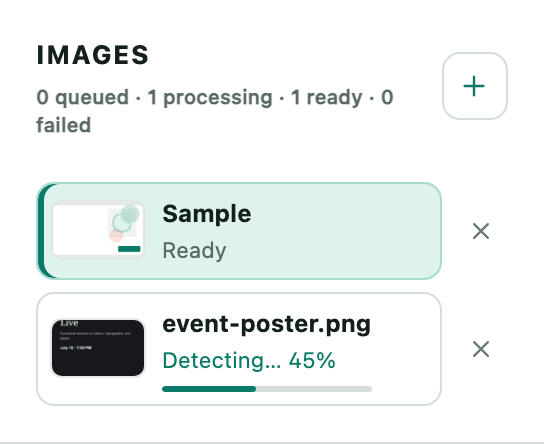
Working through a set
- Add up to eight images at once
Drop the whole batch in. They are processed independently, and you can start editing the first one while the others are still being read.
- Move through them in the panel
Switching image keeps every other image's edits. The layer list and the inspector follow whichever one you have open.
- Change only what moved
For a recurring creative that is usually one date or one price per file. Layers you leave alone are exported as the original pixels.
- Export per image or as one deck
PNG gives you one file for the image on screen. PPTX can take every image that finished, which turns a campaign set into a single reviewable deck.
One failure does not sink the batch
Images are tracked separately and the counters show failures on their own. Everything that succeeded stays usable, so you retry the one file rather than the whole set.
Nothing is stored between visits
There are no accounts and no saved projects. A batch lives in the tab you are working in, which also means closing it loses the work.
Uploads have hard limits
Eight images per batch, and each file has a size and pixel ceiling. Very large source art needs to be scaled down before it goes in.
Practical limits
- Can I apply one text change across every image?
- No. Each image keeps its own detected layers and you edit them per image. The saving is in not reopening a design tool per file, not in a bulk find-and-replace.
- How long does a batch take?
- Images are read one at a time rather than all at once, so a set takes roughly the sum of its parts. The first upload after an idle period is slower because the models load before anything else happens.
- Can I come back to a batch tomorrow?
- No. Files are temporary and there is nothing to log back into. Export what you need before you close the tab.